CoupStore may earn a commission if you buy through links on this page. It never changes your price or how we rank picks.
Quick verdict
Sell vinyl decals, iron-on shirts, cards or paper stickers: buy a Cricut. The Maker 4 is $379 on cricut.com and cuts 300+ materials with a blade, including vinyl, which xTool tells you never to put under a laser if it is PVC. Sell engraved wood, acrylic, leather or metal pieces: buy an xTool. The M2 20W is $899 and the enclosed S1 40W Basic Bundle is $1,699 on xtool.com.
Skip the laser if: you cannot vent through a window and do not want to spend $299 on xTool's Desktop Air Purifier.
Best offer right now: the xTool M2 10W shows $499, down from $599, under a site banner reading Save $500 & 60-Day Price Match. Cricut lists the Maker 4 at $379, down from $399. Both checked on the brands' own sites, October 27, 2026.
Your first year with a craft machine costs more than the price tag. A Cricut Maker 4 at $379 turns into about $537 once you add a year of Cricut Access plus spare blades and mats. An xTool M2 20W at $899 becomes $1,198 once you add the $299 purifier xTool sells for it.
What you sell decides the xTool vs Cricut question. A blade and a diode laser overlap on paper, felt and thin wood, and split everywhere else.
We read both brands' product, subscription, warranty and return pages plus xTool's safety guidance on October 27, 2026. Every price below carries that date.
xTool vs Cricut at a glance: same rows for both
| Row | Cricut | xTool | Source |
|---|---|---|---|
| How it cuts | Blade tools: fine point, deep point, knife, rotary and more | Diode laser on the M2 and S1; a blade on the new C1 | Maker 4 page, M2 page |
| Entry price | Joy 2 $99; Joy Xtra $179 | M2 10W $499 (was $599) | Cricut machines, M2 variants |
| Mid price | Maker 4 $379 (was $399); Explore 5 $199, out of stock | M2 20W $899 (was $999) | Cricut machines, M2 variants |
| Top craft model | Maker 5 $349, out of stock | S1 40W Basic Bundle $1,699 (was $2,199) | Maker 5 page, S1 variants |
| Materials | Maker 4: 300+; Explore 5: 100+; Joy Xtra: 50+ (the same page also says 75+) | S1 cuts paper, wood, leather, MDF, felt, opaque acrylic; engraves stainless steel, ceramic, stone, dark glass | Joy Xtra page, S1 page |
| Max work size | Maker 4: 11.5 x 23.5 in on a mat, 11.7 in x 12 ft on Smart Materials | S1 40W: 19.6 x 12.5 in; up to 118 in long with the conveyor feeder | Maker 4 page, S1 page |
| Software | Design Space is free; Access is $9.99 a month or $95.88 a year | XCS is free and now continues as xTool Studio | Cricut Access, Atomm on XCS |
| Ventilation | None needed | A window or an air purifier, per xTool; Desktop Air Purifier $299 | xTool safety tips, Purifier |
| Warranty | 1 year on the machine; blades and housings excluded | 12 months on main parts; purifier filters excluded | Joy warranty, xTool warranty |
| Returns | 30 days; no fee inside 14 days, then a 10% to 30% fee | xTool refund policy |
Prices are list prices on cricut.com and xtool.com, checked October 27, 2026, before tax and shipping.
Which machine should a vinyl, paper or iron-on seller buy?
Cricut. If your shop sells decals, tumbler wraps, party banners or heat-transfer shirts, a blade does the job and a laser cannot. The xTool M2 page warns you never to laser PVC, and plenty of craft vinyl is PVC. Cricut's own vinyl is cheap enough to price a decal with real margin.
Do the maths on Cricut's 15 ft roll of Permanent Vinyl at its $32.99 list price: about $2.20 a foot. The 3 ft Smart Vinyl roll at $8.99 works out to about $3.00 a foot. Both showed 50% off on the Cricut materials page on October 27, 2026.
Is the Maker 4 or the Joy Xtra the better first buy for a shop?
The Maker 4. It cuts up to 11.5 x 23.5 in on a mat at up to 14.1 inches per second and takes 13 tools, including the Knife Blade for thicker sheets. The Maker 4 page shows Access members paying $341.10.
The $179 Joy Xtra caps you at 8.2 x 11.7 in on a mat, or 8.5 in x 4 ft on Smart Materials. That fits stickers and cards. It does not fit a 12 in shirt graphic or a large wall decal, which is where many vinyl orders land.
Which machine should a wood, acrylic or leather seller buy?
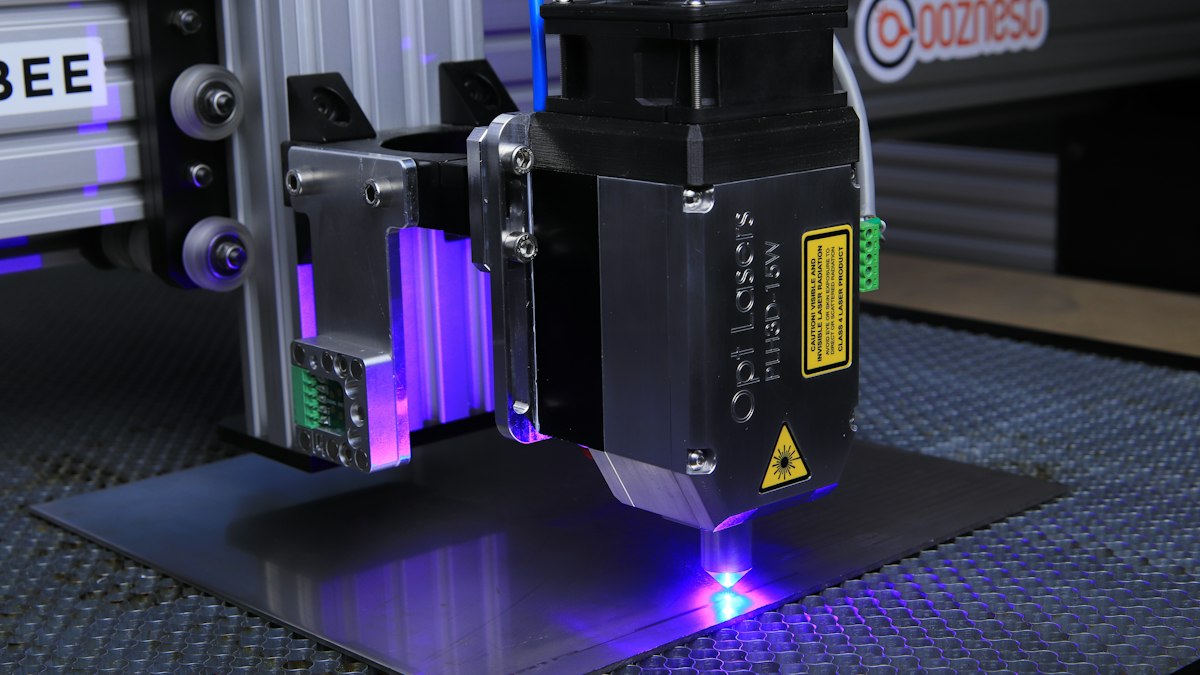
xTool. Engraved cutting boards, acrylic keychains, leather patches and metal business cards need heat, and only the laser brings it. The S1 lists stainless steel, ceramic, stone and dark glass as engraving materials, and Cricut lists none of those.
Cricut's Engraving Tool works on materials up to 3 mm, per the Maker 5 page. It scores a surface; it cannot burn a mark into wood.
Should you pick the M2 or the S1?
Pick the M2 if you want color. It pairs a 10W, 20W or 40W diode laser with a CMYK inkjet that prints on fabric, boards and paper, though not on metal, glass or ceramic. The 20W Color Print & Cut Bundle is $999 on the M2 page.
Pick the S1 if you sell volume or work in a shared room. It is fully enclosed with a UL94-V0 flame-retardant cover and a lid that lets 0.35% of the light through. The 40W cuts a 19.6 x 12.5 in area, and a conveyor feeder stretches jobs to 118 in.
Where does the new xTool C1 color cutter fit?
The C1 is xTool's answer to Cricut on Cricut's own ground: a blade cutter with a built-in scanner and CMYK printer. xTool's press release lists vinyl, HTV, leather, balsa and fabric among its materials. A $10 deposit is open now, and xTool says final payment opens in November.
The US launch price is $469 for the Basic kit, according to The Crafty Catsman. Until xTool posts it and the machine ships, a vinyl seller with orders due this season should buy a machine that exists today.
What does each machine cost in year one?
Here is the maths with every line priced from the brands' own sites on October 27, 2026. The blade and mat rows are a usage scenario, not a Cricut figure: four replacement blades and two 6-packs of mats in a year.
| Year-one line | Cricut Maker 4 | xTool M2 10W | xTool M2 20W |
|---|---|---|---|
| Machine | $341.10 (Access member price; $379 without) | $499 | $899 |
| Software | $95.88 (Access Standard, billed yearly) | $0 (XCS / xTool Studio) | $0 (XCS / xTool Studio) |
| Fume control | $0 | $299 Desktop Air Purifier | $299 Desktop Air Purifier |
| Blades: 4 x $14.99 Premium Fine-Point | $59.96 | n/a | n/a |
| Mats: 2 x $19.99 Standard Grip 6-pack | $39.98 | n/a | n/a |
| Purifier filter packs | n/a | ||
| Year-one total, priced lines | $536.92 | $798 | $1,198 |
Skip Access and the Cricut total drops to $478.94: $379 plus $99.94 of blades and mats. So the subscription costs you $58 net in year one once the $37.90 member discount on the machine is counted.
What do the year-one numbers leave out?
Raw materials, because your product mix sets them, not the machine. xTool's replacement filter price and a fire extinguisher are also missing, so the xTool columns run low.
What does Cricut Access paywall, and does xTool charge for software?
Cricut Access: what $95.88 a year buys you
Design Space itself is free. The free account gets 3,000+ images, 100+ fonts and 5 collections. Standard, at $9.99 a month or $95.88 a year on the Cricut Access page, opens 1,500,000+ images, 1,000+ fonts and the Background Remover, Convert to Layers and Warp tools.
Premium costs $14.99 a month or $119.88 a year and adds 20% off Cricut materials plus free economy shipping over $50. The maths: 20% off $300 of Cricut vinyl a year saves $60, which covers the $24 annual gap over Standard. Cricut's footnote says the materials discount cannot stack with the 10% everyday discount.
Is xTool's software free?
Yes for the core app. Atomm, xTool's community site, calls XCS free and included with every xTool machine, and says it now continues as xTool Studio. The P3, F2 line and machines released after August 2025 run only on Studio.
There is a paid layer. The M2 page advertised a launch promo with a 2-month free Atomm Pro subscription, and Atomm sells some creator projects by credit. We found no Atomm Pro price on xTool's pages, and you do not need it to run the laser.
What will you keep buying after the machine?
Cricut: blades, mats and vinyl
A Premium Fine-Point replacement blade lists at $14.99 and a 6-pack of 12 x 12 in Standard Grip mats at $19.99. Thicker work needs the Knife Blade with drive housing at $49.99 list. Cricut's one-year warranty excludes blades, housings and materials, so these are always on you.
xTool: filters, materials and fire safety
The $299 Desktop Air Purifier uses activated carbon and HEPA filters and ships with two spare pre-filters. xTool's advice is to replace the filter pack after three pre-filters are used. xTool's warranty covers the purifier's main parts for 12 months but not its filter or exhaust pipe.
Laser stock is the other line. xTool sells basswood, acrylic, cork and metal blanks, and its M2 page says never to laser PC, PVC, or leather and foam of unknown composition.
How much space and ventilation does an xTool laser need?
xTool's safety tips page says lasers create fumes and smoke and that ventilation can run through a window or an air purifying system. A Cricut has no fumes, so it can sit on a desk in a closed spare room. A laser cannot.
The S1 has built-in exhaust fans and a light-filtering lid. The M2 page does not describe an enclosure, so check before setting one up near kids or pets.
What happens if the machine breaks or you change your mind?
xTool covers main parts, including the laser, for 12 months on the M2 and S1. The optional xToolCare plan extends coverage up to 3 years, with no price on the warranty page. Cricut's Joy and Venture warranty documents give one year from purchase and void coverage if you run the machine above 104°F.
xTool's refund policy gives 30 days. Returns inside 14 days carry no fee. After that the fee is 10% unopened, 15% opened and unused, and 30% opened and used, on the order total including tax and shipping. The machine must have lasered fewer than 50 times.
Return a used $899 M2 on day 20 and the fee is at least $269.70, plus return shipping you pay yourself. Do your first projects inside 14 days.
Cricut's return page would not load for us. A third-party summary says you get 5 days from delivery to request a return and the item must be unopened. Until that is confirmed, treat an opened Cricut as yours.
What did xTool and Cricut run on Black Friday 2025?
Neither brand has announced Black Friday 2026 deals as of October 27, 2026. Here is what each ran last year, as a guide to what to expect, not a promise.
| Black Friday 2025 | Cricut | xTool | Source |
|---|---|---|---|
| Sale window | Deals ran up to and past Black Friday | November 3 through Cyber Monday | Creative Bloq, xTool recap |
| Headline machine deal | Maker 4 $379 (from $399) | F1 $999 (from $1,499); P3 $6,300 (from $6,999) | Creative Bloq, TechRadar |
| Other deals | Joy Xtra $149 on Amazon (from $179); EasyPress 3 $99.99 (from $249.99) | $150 to $1,500 off machine orders over $1,499, applied automatically | Creative Bloq, xTool recap |
| Extras | None listed | $79 gift set for the first 1,200 orders on November 28 and December 1 | xTool recap |
Is the Maker 4 already at its Black Friday price?
Based on past years, yes. The Maker 4's Black Friday 2025 price was $379, and that is what cricut.com lists today. Waiting a month may not lower that model, though 2026 could bring bundles or a deeper cut on the Joy line.
Can xTool's price match cover a Black Friday drop?
Often. xTool's price match policy refunds the difference if an eligible product's price drops within 60 days of purchase. Buy today and that window runs past both Black Friday on November 27 and Cyber Monday on November 30.
The catch is the exclusions: flash-sale, limited-quantity, coupon-only, bundle-only and membership-only prices do not count unless xTool approves them. xTool's 2025 Thursday Lightning Deals were limited-quantity, so a drop like that would likely fall outside the match.
Current xTool deals sit on our xTool coupons page. Our code check process explains what we confirm before listing one, and the Black Friday hub tracks 2026 announcements.
Questions sellers ask about xTool vs Cricut
Can a Cricut engrave wood like an xTool?
No. Cricut's Engraving Tool scratches the surface, and the Maker 5 page limits it to materials up to 3 mm. An xTool diode laser burns the mark and also cuts wood, leather and opaque acrylic.
Can an xTool cut vinyl?
Not with the laser. xTool's M2 page says never to laser PVC, which much craft vinyl is made of. xTool's blade answer is the new C1 color cutter, which lists vinyl and HTV among its materials.
Do you need Cricut Access to sell what you make?
You do not need it to run the machine, since Design Space is free. Access adds images, fonts and tools like Warp and Background Remover for $9.99 a month or $95.88 a year.
Is xTool software really free?
The core app is. Atomm calls XCS free and included with every machine, and it now continues as xTool Studio. Atomm Pro is a separate paid membership you do not need to run the laser.
Do you need an air purifier for an xTool?
You need ventilation. xTool says it can run through a window or an air purifying system. If you have no window to vent through, budget $299 for the Desktop Air Purifier.
Should you wait for Black Friday 2026 to buy?
For the Maker 4, waiting may save nothing, since its 2025 Black Friday price matches today's $379. For xTool, buying now keeps you inside the 60-day price match through Cyber Monday, minus flash-sale exclusions.
Write down the three products you sell most. If two are vinyl, paper or iron-on, order the Cricut Maker 4. If two need wood, acrylic or a burned mark, order the xTool M2 20W with the purifier and start your test projects inside the 14-day free-return window.
About the author
Ethan Brooks, Shopping editor
Ethan writes CoupStore's store guides and Top 15 lists for shoppers in the US: what a store sells, how its pricing and delivery work, and which offers are worth using.